
The Whole Rosetta
Family. One Bundle.
EQ 2, Compressor 2, Reverb, Delay and De-Esser. Five plugins that speak your language, in one bundle. No frequencies, no ratios, no milliseconds. Trust your ears.

Five Plugins. One Language.
Every Rosetta plugin names its controls for what you hear. Together they cover a whole chain — tone, dynamics, space, echoes and sibilance.
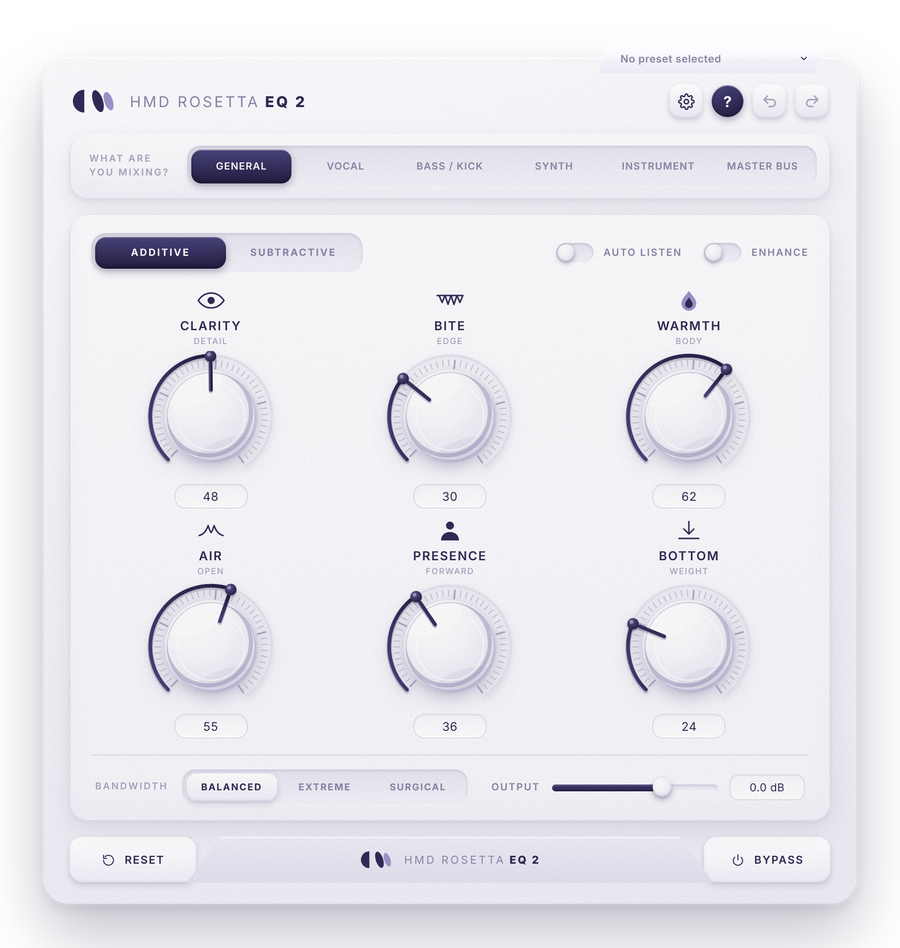
Rosetta EQ 2
EQ that speaks your language — describe the sound and Rosetta finds it.
$69.99$42.0040% off
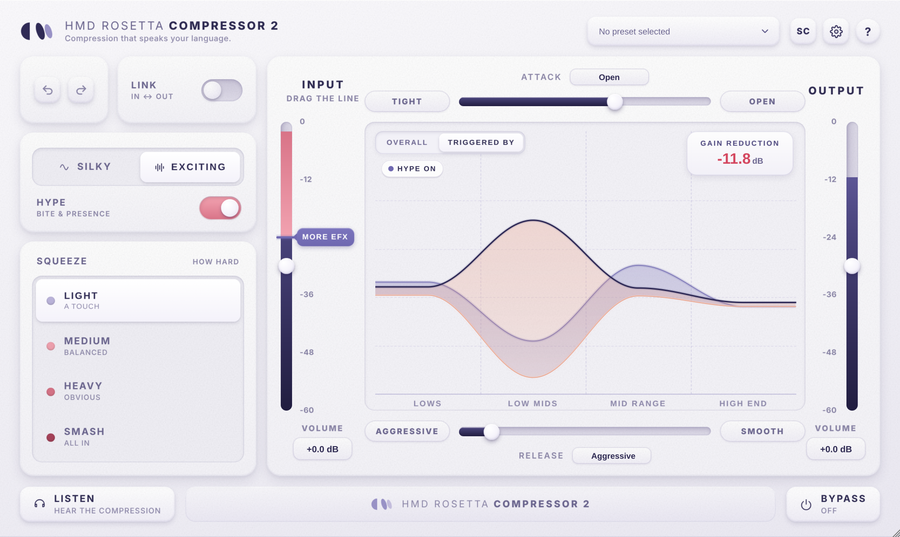
Rosetta Compressor 2
Drag a line, pick how hard, choose how it moves — and watch it work.
$69.99$42.0040% off
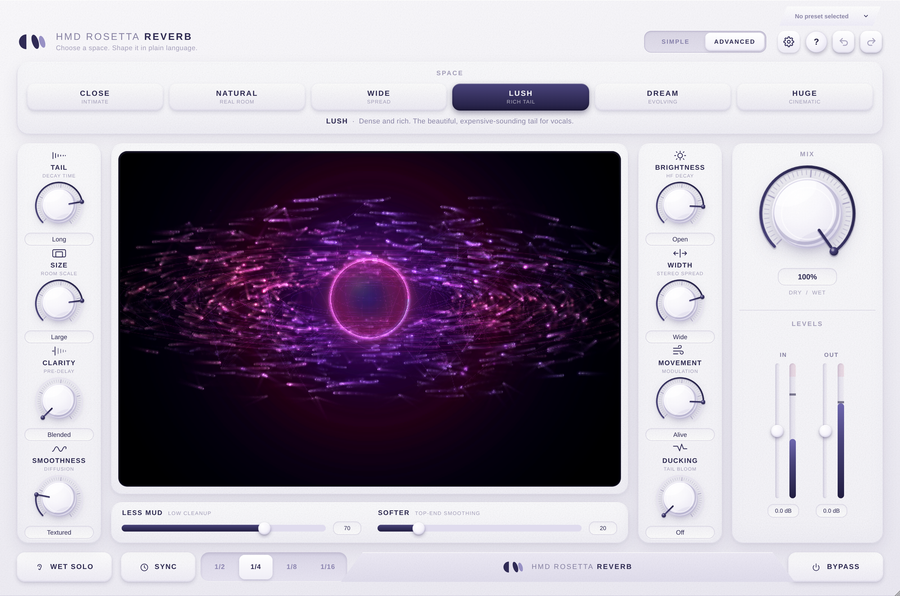
Rosetta Reverb
Six rooms, six engines, eight controls named for what you hear.
$69.99$42.0040% off
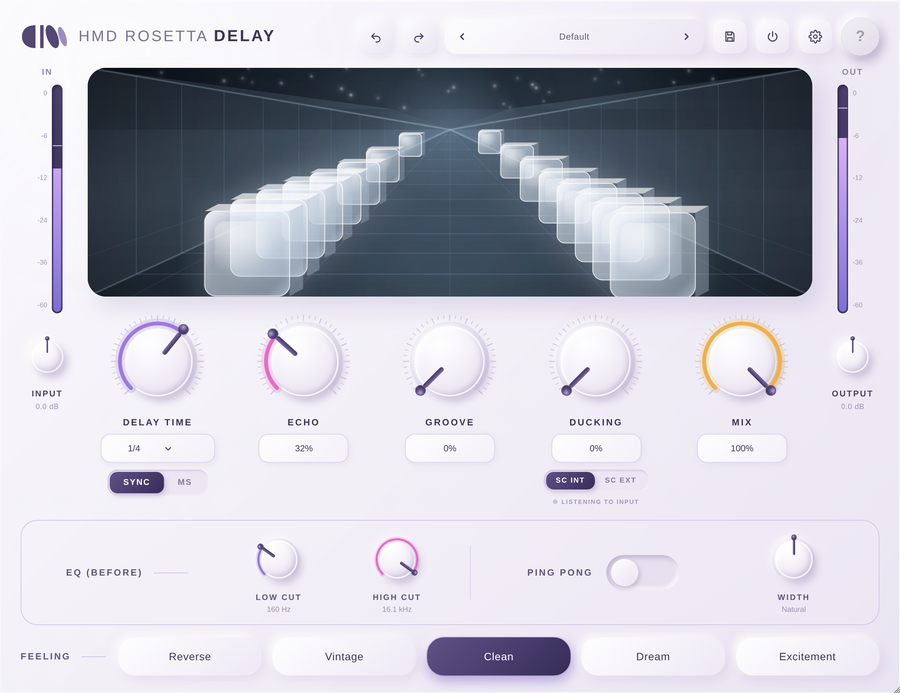
Rosetta Delay
Five feelings, and every echo lights up the hallway as you hear it.
$69.99$42.0040% off
Rosetta De-Esser
Cuts the sharp ess and the long hiss — transparent until it acts.
$69.99$42.0040% off
Every Plugin, Every Control
Pick a plugin, then hover a dot — or a control in the list — to see what it does.

01What Are You Mixing?
Six sources — General, Vocal, Bass / Kick, Synth, Instrument and Master Bus. Pick one and all twelve knobs retune themselves for it.
6 sources
02Additive / Subtractive
Flips between the two pages of knobs. Both pages are always working at the same time.
Both always active
03Auto Listen
Switch it on, then hold any knob to hear only the part of the sound that knob changes. Let go and the full sound comes back.
Hold to hear
04Enhance
Gentle saturation that follows your boosts — more warmth, richness and density where you turn up, nothing where you don’t.
Follows your boosts
05Clarity
Brings out detail and definition. On Bass / Kick it drops down to the growl and click.
Detail
06Warmth
A broad, gentle lift in the low mids — the part that makes a sound feel thick and solid rather than thin.
Body
07Air
A smooth lift of the highest highs that keeps rising gently, with no ringing peak.
Open
- 01
What Are You Mixing?
Six sources — General, Vocal, Bass / Kick, Synth, Instrument and Master Bus. Pick one and all twelve knobs retune themselves for it.
6 sources
- 02
Additive / Subtractive
Flips between the two pages of knobs. Both pages are always working at the same time.
Both always active
- 03
Auto Listen
Switch it on, then hold any knob to hear only the part of the sound that knob changes. Let go and the full sound comes back.
Hold to hear
- 04
Enhance
Gentle saturation that follows your boosts — more warmth, richness and density where you turn up, nothing where you don’t.
Follows your boosts
- 05
Clarity
Brings out detail and definition. On Bass / Kick it drops down to the growl and click.
Detail
- 06
Warmth
A broad, gentle lift in the low mids — the part that makes a sound feel thick and solid rather than thin.
Body
- 07
Air
A smooth lift of the highest highs that keeps rising gently, with no ringing peak.
Open

01Silky / Exciting
The character. Silky glides and glues; Exciting snaps back and keeps things punchy.
Optical · Electronic style
02Hype
Adds warm harmonic bite after the compressor, then a gentle lift of the mids and presence. Off is completely out of the path.
Bite & presence
03Squeeze
How hard it squeezes once the sound is over the line — four steps, each with a word that tells you what to expect.
Light · Medium · Heavy · Smash
04The Line
Anything louder than the line gets compressed. Drag it down and more of your sound crosses it. The round thumb is the input volume.
More EFX
05Overall / Triggered By
Switch the display between its two views. They glide into each other, and your choice is saved with the session.
Two views
06Triggered By
Your sound from the lows to the high end. The coral line drops wherever the sound is pushing the compressor — a deep dip in the low mids means that part is crossing the line.
What’s causing it
07Gain Reduction
Either way, this tells you how much the loudest moments are being turned down right now.
Live, in dB
- 01
Silky / Exciting
The character. Silky glides and glues; Exciting snaps back and keeps things punchy.
Optical · Electronic style
- 02
Hype
Adds warm harmonic bite after the compressor, then a gentle lift of the mids and presence. Off is completely out of the path.
Bite & presence
- 03
Squeeze
How hard it squeezes once the sound is over the line — four steps, each with a word that tells you what to expect.
Light · Medium · Heavy · Smash
- 04
The Line
Anything louder than the line gets compressed. Drag it down and more of your sound crosses it. The round thumb is the input volume.
More EFX
- 05
Overall / Triggered By
Switch the display between its two views. They glide into each other, and your choice is saved with the session.
Two views
- 06
Triggered By
Your sound from the lows to the high end. The coral line drops wherever the sound is pushing the compressor — a deep dip in the low mids means that part is crossing the line.
What’s causing it
- 07
Gain Reduction
Either way, this tells you how much the loudest moments are being turned down right now.
Live, in dB

01Space
Six genuinely different engines. Exactly one is lit, always, and switching crossfades with no click.
Close · Natural · Wide · Lush · Dream · Huge
02Tail
How long the reverb lasts.
Decay time
03Size
How big the room feels.
Room scale
04Clarity
Puts a gap between your sound and the reverb answering it, so the source stays legible in front of a big tail.
Pre-delay
05The Living Display
Simple gives the visualizer the full width of the window.
Full width
06Ducking
Holds the reverb down while the source plays and lets it bloom in the gaps — nothing to set.
Tail bloom
07Mix
How much reverb you hear.
Dry / Wet
- 01
Space
Six genuinely different engines. Exactly one is lit, always, and switching crossfades with no click.
Close · Natural · Wide · Lush · Dream · Huge
- 02
Tail
How long the reverb lasts.
Decay time
- 03
Size
How big the room feels.
Room scale
- 04
Clarity
Puts a gap between your sound and the reverb answering it, so the source stays legible in front of a big tail.
Pre-delay
- 05
The Living Display
Simple gives the visualizer the full width of the window.
Full width
- 06
Ducking
Holds the reverb down while the source plays and lets it bloom in the gaps — nothing to set.
Tail bloom
- 07
Mix
How much reverb you hear.
Dry / Wet

01The Hallway
Lights a pair of cubes for every real echo you hear, front to back, fading as the echo fades. Its colour tells you which Feeling is on.
See every repeat
02Delay Time
The gap between your sound and each echo. Drag the knob or click the box to pick from a list.
1/64 → 1 bar · 20 ms → 2 s
03Echo
How many times the sound repeats. Even at 100% the echoes still fade away — never a runaway howl.
Feedback
04Ducking
Turns the echoes down while your sound plays and lets them swell back in the gaps.
Up to ~30 dB
05EQ (Before)
Low Cut and High Cut shape what goes into the echoes. Your dry sound is never touched.
20 Hz – 20 kHz
06Ping Pong
Bounces the echoes left, right, left — each pair at an even level, so it never leans to one side.
Stereo bounce
07Feeling
The personality of the echoes. Switch while it plays — the change glides in and the hallway changes colour.
Reverse · Vintage · Clean · Dream · Excitement
- 01
The Hallway
Lights a pair of cubes for every real echo you hear, front to back, fading as the echo fades. Its colour tells you which Feeling is on.
See every repeat
- 02
Delay Time
The gap between your sound and each echo. Drag the knob or click the box to pick from a list.
1/64 → 1 bar · 20 ms → 2 s
- 03
Echo
How many times the sound repeats. Even at 100% the echoes still fade away — never a runaway howl.
Feedback
- 04
Ducking
Turns the echoes down while your sound plays and lets them swell back in the gaps.
Up to ~30 dB
- 05
EQ (Before)
Low Cut and High Cut shape what goes into the echoes. Your dry sound is never touched.
20 Hz – 20 kHz
- 06
Ping Pong
Bounces the echoes left, right, left — each pair at an even level, so it never leans to one side.
Stereo bounce
- 07
Feeling
The personality of the echoes. Switch while it plays — the change glides in and the hallway changes colour.
Reverse · Vintage · Clean · Dream · Excitement

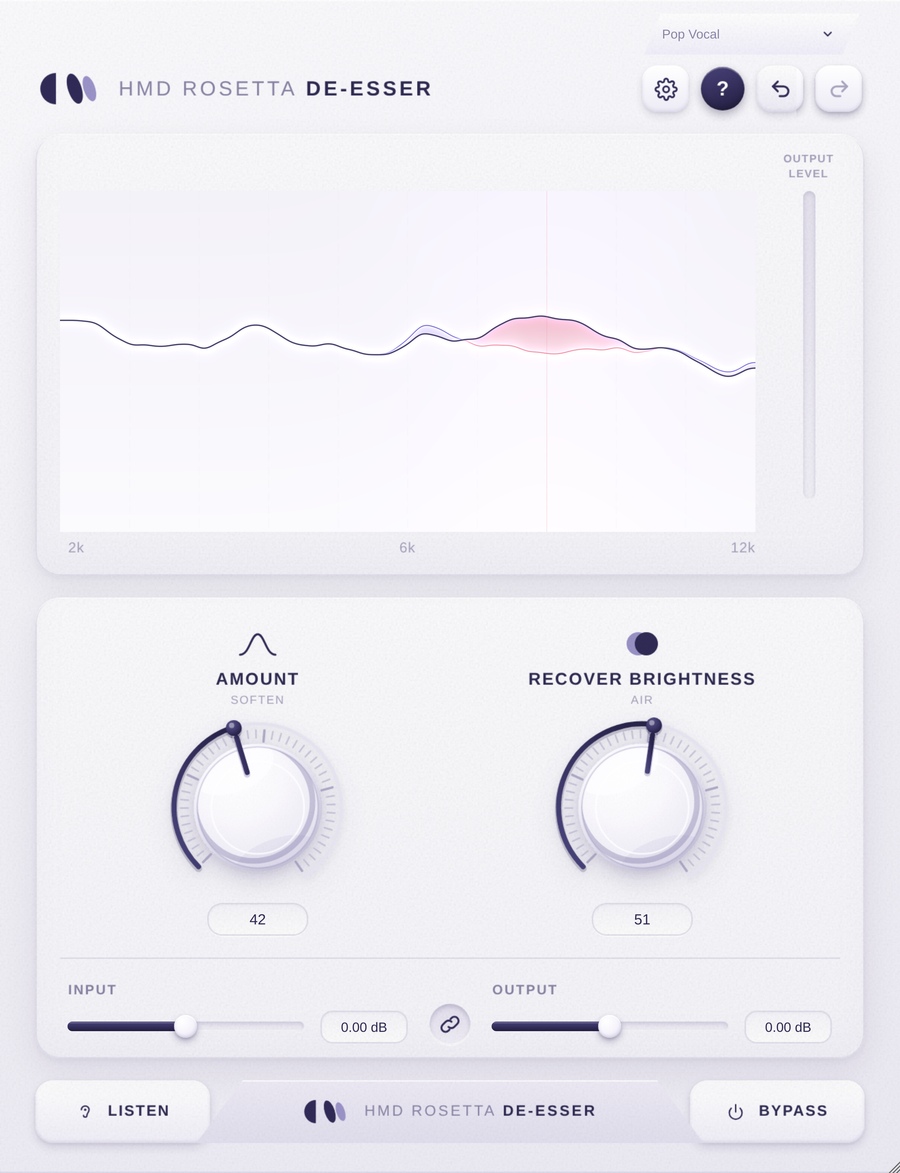
01Live Sibilance Display
Sibilant energy from 2 kHz to 12 kHz in real time. The bright trace is what Rosetta hears; the shaded field is how sure it is that it’s sibilance.
2 kHz – 12 kHz
02Amount
One knob for how much — how readily sibilance is caught and how firmly it’s pulled down, together. Zero is a true zero.
Soften
03Recover Brightness
Puts the air back — a tube-style top-end lift plus a presence lift that only appears when something was actually removed.
Air
04Input / Output
Trim either end. Push the input to drive the detector harder.
Gain
05Link
Ties input and output together, so you can drive the detector without changing your output level.
In ↔ Out
06Listen
Solos exactly what is being removed — the fastest way to hear if you’re catching vowels.
Hear the removed band
07Bypass
Smoothed and click-free, so you can A/B mid-phrase. No click, no level jump.
Click-free
- 01
Live Sibilance Display
Sibilant energy from 2 kHz to 12 kHz in real time. The bright trace is what Rosetta hears; the shaded field is how sure it is that it’s sibilance.
2 kHz – 12 kHz
- 02
Amount
One knob for how much — how readily sibilance is caught and how firmly it’s pulled down, together. Zero is a true zero.
Soften
- 03
Recover Brightness
Puts the air back — a tube-style top-end lift plus a presence lift that only appears when something was actually removed.
Air
- 04
Input / Output
Trim either end. Push the input to drive the detector harder.
Gain
- 05
Link
Ties input and output together, so you can drive the detector without changing your output level.
In ↔ Out
- 06
Listen
Solos exactly what is being removed — the fastest way to hear if you’re catching vowels.
Hear the removed band
- 07
Bypass
Smoothed and click-free, so you can A/B mid-phrase. No click, no level jump.
Click-free

Describe It. Don’t Decode It.
Most plugins hand you frequencies, ratios and milliseconds and leave you to translate. Every Rosetta plugin asks plain questions instead — what are you mixing, how much, how hard, how should it feel — and every answer is a word you would actually use in a session.
- EQ 2 — Clarity, Warmth, Air, Muddy, Harshness
- Compressor 2 — drag the line, pick a Squeeze
- Reverb — Tail, Size, Clarity, Movement
- Delay — Reverse, Vintage, Clean, Dream, Excitement

They Share More Than A Look
The Rosetta plugins are built from each other. Delay’s Dream feeling blooms into the same engine as Rosetta Reverb. Its Vintage and Excitement feelings get their warmth and bite from the Enhance saturation in EQ 2. Its ducking listens the way Reverb’s does, and its sidechain works like Compressor 2’s.
- Auto Listen, Listen and Wet Solo to hear what each move does
- Zero added latency on EQ 2, Compressor 2, Reverb and Delay
- Presets and undo / redo in every plugin
- Hover tips that explain every control in plain words

Five Plugins. One Price.
Bought one at a time, the five Rosetta plugins come to $349.95. The Suite is $299.99, so one of them is on us. Same plugins, same presets and sessions.
- All five Rosetta plugins
- One purchase covers all five
- AU, VST3 and AAX on macOS · VST3 and AAX on Windows
- Sign in to activate — no keys, no dongle
The Technical Detail
Common Questions
Five plugins: Rosetta EQ 2, Rosetta Compressor 2, Rosetta Reverb, Rosetta Delay and Rosetta De-Esser.
Yes. The five plugins are $69.99 each, which is $349.95 bought separately. The Suite is $299.99.
No. Every Rosetta plugin names its controls for what you hear — Clarity, Warmth, Squeeze, Tail, Echo, Amount — so you work by ear, not by numbers.
No. EQ 2 and Compressor 2 are new plugins, built from the ground up, so sessions, automation and presets from the originals won’t carry over. Keep the originals installed for older projects that use them.
The first time you open each plugin, press Activate and your browser opens your Help Me Devvon account — sign in, or start the free 7-day trial right there. No key to type, no dongle. Once you own it, it keeps working offline for good.
AU, VST3 and AAX on macOS (10.15 or later); VST3 and AAX on Windows.
No — each plugin works on its own, on any track. They’re built as a family, so they also sit naturally in one chain.
Get The Rosetta Suite Bundle
Five plugins. One language. Trust your ears.